

+
'%20fill-rule='nonzero'%3e%3c!--%20Main%20purple%20background%20--%3e%3crect%20fill='%235059C9'%20x='40'%20y='0'%20width='80'%20height='80'%20rx='8'/%3e%3c!--%20T%20letter%20--%3e%3cpath%20d='M60,20%20L100,20%20L100,30%20L85,30%20L85,65%20L75,65%20L75,30%20L60,30%20L60,20%20Z'%20fill='%23FFFFFF'/%3e%3c!--%20Person%20circle%20(large)%20--%3e%3ccircle%20fill='%237B83EB'%20cx='100'%20cy='35'%20r='20'/%3e%3c!--%20Person%20head%20--%3e%3ccircle%20fill='%23FFFFFF'%20cx='100'%20cy='30'%20r='8'/%3e%3c!--%20Person%20body%20--%3e%3cpath%20d='M88,48%20C88,42%2093,38%20100,38%20C107,38%20112,42%20112,48%20L112,55%20L88,55%20L88,48%20Z'%20fill='%23FFFFFF'/%3e%3c!--%20Smaller%20person%20circle%20--%3e%3ccircle%20fill='%237B83EB'%20cx='30'%20cy='55'%20r='18'/%3e%3c!--%20Smaller%20person%20head%20--%3e%3ccircle%20fill='%23FFFFFF'%20cx='30'%20cy='50'%20r='6'/%3e%3c!--%20Smaller%20person%20body%20--%3e%3cpath%20d='M20,62%20C20,57%2024,54%2030,54%20C36,54%2040,57%2040,62%20L40,68%20L20,68%20L20,62%20Z'%20fill='%23FFFFFF'/%3e%3c!--%20Chat%20bubble%20/%20content%20area%20--%3e%3crect%20fill='%234B53BC'%20x='0'%20y='40'%20width='70'%20height='60'%20rx='6'/%3e%3crect%20fill='%23FFFFFF'%20x='10'%20y='52'%20width='35'%20height='4'%20rx='2'/%3e%3crect%20fill='%23FFFFFF'%20x='10'%20y='62'%20width='50'%20height='4'%20rx='2'/%3e%3crect%20fill='%23FFFFFF'%20x='10'%20y='72'%20width='40'%20height='4'%20rx='2'/%3e%3crect%20fill='%23FFFFFF'%20x='10'%20y='82'%20width='30'%20height='4'%20rx='2'/%3e%3c/g%3e%3c/g%3e%3c/svg%3e)
Install SlackBridge
Connect Slack and Microsoft Teams channels
Bridge Your Communication
SlackBridge enables seamless, bi-directional messaging between your Slack workspace and your clients' Microsoft Teams channels. Stay in your preferred platform while maintaining real-time communication with external partners.

See It In Action
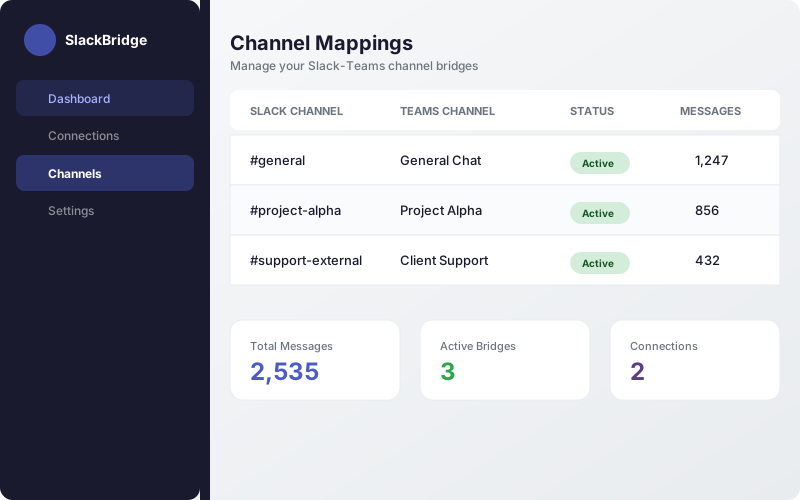
Channel Mappings
Map Slack channels to Teams channels with real-time message counts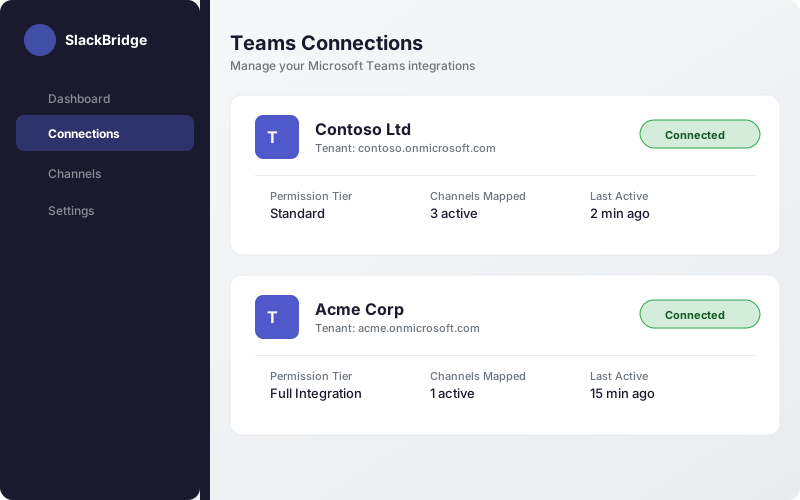
Teams Connections
Connect multiple Microsoft Teams tenants with guided setupBi-directional Sync
Messages flow both ways between Slack and Teams in real-time
2-Minute Setup
Install, connect Teams, map channels, and start messaging
Enterprise Security
OAuth 2.0, no message storage, hosted on infrastructure providers with SOC 2 Type II reports
Permissions Requested
SlackBridge requires these permissions to bridge messages between platforms:
Channel Access
- Read messages in channels the bot is added to
- Send messages to bridged channels
- Join public channels when invited
User & Workspace Info
- View user display names for message attribution
- View workspace name for dashboard display
- Authenticate users for the management dashboard

By installing, you agree to our Terms of Service and Privacy Policy
Questions? Contact Support